
(Tested Live — Here’s What Happened)
You spent three hours writing one blog post.
You hit publish. You shared it once on social. Maybe twice. Then you moved on to the next thing.
And that post sits there. While you’re already grinding on the next one.

You’re wasting 90% of your content’s potential. Not because the writing is weak — because you only use it once.
I tested running a 3-prompt AI workflow that takes a single blog post and turns it into a full week of multi-platform content. Tested it on my own published article. Here’s what went down. I have a lot of tools like this in my workflow, but here’s the one I’m sharing today. Honestly…for me to save I have a workflow is almost disingenuous. I truly operate like a mad scientist, and collect systems, hacks, and the like to the level of an internet hoarder. But I digress.
The Problem Of Location
Your audience doesn’t live on one platform.
Some read long blog posts with morning coffee. Others scroll LinkedIn during lunch. Your video-first people want short-form. Your newsletter subscribers want curated insights in their inbox.
Publish in one format and you’re ignoring most of your audience.
But manual repurposing is brutal. By the time you adapt one post for three platforms, you could’ve written two new ones. So a lot of creators skip it. Or they do it badly — lazy copy-paste jobs that scream “I just reused my blog post.”
I went looking for a better way. Stumbled on a technique from Skill Arbitrage that uses a 3-prompt chain to extract, adapt, and schedule content from a single source. I stripped it down, tested it on a real post, and built a version that actually works pretty well.
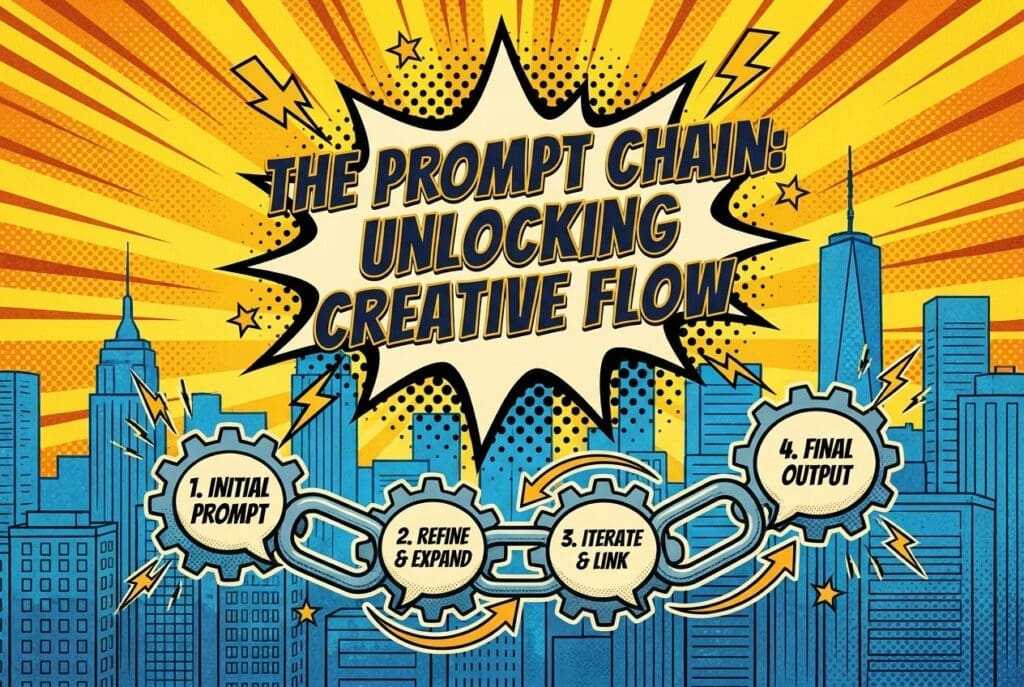
The Technique: The 3-Prompt Chain
Three prompts. Run them in order after your blog post is written and published.
Prompt 1 — Extract Core Content Blocks:
Extract the 5 most important takeaways from this blog post that would work as standalone insights. Also identify 3 quotes that would perform well on social media and 1 practical tip that provides immediate value.
Prompt 2 — Generate Platform-Specific Assets:
Now take these extracted elements and create platform-specific content assets: 1 LinkedIn post (1300 chars max), 1 Twitter/X thread (5 tweets, each under 280 chars), 1 Instagram caption (hook first line, 3 lines of value, CTA), 1 newsletter teaser (50 words max), 1 short-form video script outline (30-60 seconds, talking head format).
Prompt 3 — Build the Schedule:
Now organize these assets into a 7-day posting schedule. Specify platform, day, time, and which asset to post.
Paste in your full blog post before Prompt 1. That’s the whole system.
The Live Test
I ran this on a real article I published: “The 4-Step Prompt Chain That Makes AI Catch Its Own Mistakes.”
Prompt 1: Extraction Results
The AI pulled out 5 standalone takeaways, 3 social-ready quotes, and 1 practical tip from a single blog post.
One of the quotes it grabbed:
“Same AI. Same model. Same session. The first response was generic filler. The revised version had specific, actionable techniques the first pass completely missed.”
That’s a tweet. Pulled straight from the article. No editing needed.
Prompt 2: Platform-Specific Assets
The AI generated five complete assets, each formatted for its platform. Here’s the LinkedIn post it wrote:
Most creators use AI like a vending machine. Type in, get out, ship it.
But AI is confidently wrong more often than you think. It states things with conviction that just aren’t accurate.
I found a fix: the Self-Review Loop. Three follow-up prompts that make AI audit its own work before you touch it.
Tested it live. The first pass gave me 6 generic tips. After the self-review loop, I got 6 specific techniques — including two the original completely missed.
The gap check is where the magic lives. Not the fact audit.
Full breakdown in the comments. 👇
The Twitter thread came out as 5 tweets, each under 280 characters, with a hook on tweet 1 and a payoff on tweet 5. The Instagram caption opened with a hook, gave 3 lines of value, and ended with a CTA. The newsletter teaser came in at 48 words. The short-form video script had a timestamped outline with a 3-second hook and a 10-second CTA.
Five assets from one blog post. Took about 90 seconds of prompting.
Prompt 3: The Schedule
The AI built a 7-day posting calendar:
- Monday: LinkedIn post — 9:00 AM
- Tuesday: Twitter/X thread — 8:00 AM
- Wednesday: Instagram post — 12:00 PM
- Thursday: Newsletter send — 10:00 AM (teaser drives to full article)
- Friday: Short-form video (TikTok/Reels/Shorts) — 5:00 PM
- Sat-Sun: Rest
One blog post. Five assets. Five days of scheduled posts across four platforms.
What I Learned From Running It
The workflow holds up. But the original article skips a few things that matter.
The extraction prompt does the heavy lifting.
Skip straight to “turn this into social posts” and you get garbage back. The extraction step — pulling out takeaways, quotes, and tips first — gives the AI raw material to work with. Without it, the platform-specific assets come out generic and repetitive. With it, each asset stands on its own because it’s built from a specific insight, not a summary.
Tell the AI what NOT to do.
I added this line to Prompt 2: “Do not simply summarize the article. Each asset should work as standalone content for someone who never read the original post.”
Without that instruction, the LinkedIn post and Twitter thread said the same thing in different lengths. With it, each asset covered a different angle from the article. Big difference.
You still need to edit.
The AI output is about 80% ready. Not 100%. The LinkedIn post needed two words changed. The Twitter thread needed a punchier tweet 5. The video script was too wordy for 60 seconds — I cut 15 words.
This is where most creators get lazy. They take the AI output and publish it as is. Don’t. Spend 5 minutes editing. Your voice is what makes it worth reading.
One blog post can fuel more than 5 assets.
I asked for 5 in the test. But the same extraction results could produce a carousel, a podcast talking point list, a Quora answer, a Reddit post, or an email reply sequence. The extraction is where the value lives. The platform adaptation is just reshaping what you already pulled.
The Copy-Paste Version
Save this. Run it after every blog post you publish:
Prompt 1:
Here is my blog post: [paste full text]. Extract the 5 most important takeaways that would work as standalone insights. Also identify 3 quotes that would perform well on social media and 1 practical tip that provides immediate value.
Prompt 2:
Now take these extracted elements and create platform-specific content assets. Each asset should work as standalone content for someone who never read the original post. Do not simply summarize the article.
– 1 LinkedIn post (1300 chars max, professional but conversational)
– 1 Twitter/X thread (5 tweets, each under 280 chars)
– 1 Instagram caption (hook first line, 3 lines of value, CTA)
– 1 newsletter teaser (50 words max, drive clicks to full article)
– 1 short-form video script outline (30-60 seconds, talking head format)
Prompt 3:
Now organize these assets into a 7-day posting schedule. Specify platform, day, time, and which asset to post.
Three prompts. About 90 seconds. One week of content from a single post.
The Bottom Line
If you’re publishing one blog post and moving on, you’re doing it the hard way.
You already did the hard part — the research, the writing, the editing. Getting more mileage from it is the easy part.
This workflow costs nothing. Just three prompts and five minutes of editing.
The original concept is from Skill Arbitrage’s guide on repurposing content with AI. I tested it, cut what didn’t work, added the “standalone content” instruction, and found that the extraction step is where the real value lives — not the adaptation step.
Run it on your next published post. One blog post. One week of content. About 90 seconds.
If you are running this for clients rather than yourself, the social media management hustle is where it turns into money.